Parish Safeguarding Dashboard and Safeguarding Hubs
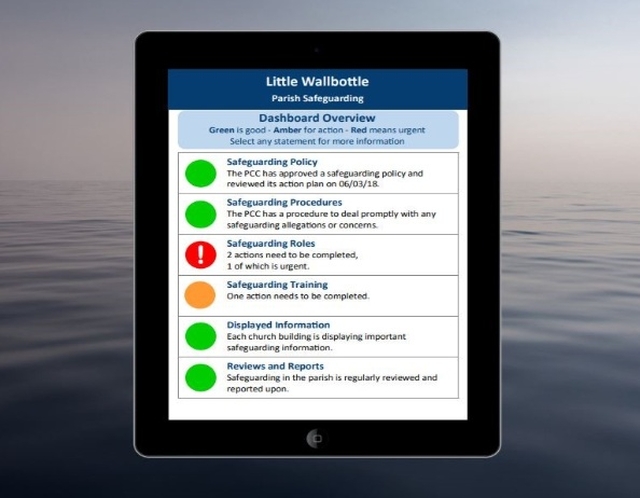
The Diocese of Carlisle has invested in the Parish Dashboards and Safeguarding Hubs to make it easier for parishes to manage their safeguarding requirements. The Safeguarding Dashboard is an online platform, FREE for parishes to use and have been designed with easy navigation on any computer, mobile phone or tablet.
Each parish dashboard usually has a maximum of two ‘owners’ (usually clergy and PSO), who can update and amend it, and multiple ‘viewers’ who are able to see its progress.The dashboard overview page allows the owner and viewers to see the current status of parish compliance with safeguarding at a glance.
The dashboard has a traffic light system to keep you on track. A green light would mean all is well, amber would mean that action is needed and red would mean urgent action is required.See a list of all the Safeguarding Dashboard Lights here.
How do I get my first green light? –we can show you here.
It will even produce a Safeguarding Action Plan at the click of a button for discussion and approval by the PCC. All parishes should have a safeguarding action plan as it has been a requirement since the implementation of the 2017 Promoting a Safer Church Policy.
Watch a video or download a brochure to quickly discover the benefits for Clergy, Parish Safeguarding Officers and PCCs.The system was developed by Clearly Simpler Limited for use throughout the Church of England.Look at their website for more details.
Safeguarding Hubs:
The Safeguarding Hubs are an extension of the Parish Dashboards, with the primary function of assisting parishes meet the requirements of ‘Safer Recruitment and People Management Guidance’. This includes manging recruitment processes, DBS requirements and safeguarding training needs. The hubs are fully integrated into the Parish Dashboards and function in very similar ways. To find out more about the hubs, please read this helpful information and take a look at the three helpful tutorialsfor general use.
Please note:You will be able to access the ‘Safeguarding Hub’ once your parish has reached Level 2 across all areas. You will be able to use the ‘Recruitment Tracker’ section of the hub once your parish moves to Level 3 across all areas. Please refer to the guidance video for the ‘Recruitment Tracker’ section of the hub.
How can I sign my parish up for its own Safeguarding Dashboard and Safeguarding Hub?
All parishes have already been sent an ‘invitation’ to sign-up to the Parish Dashboard. However, if any parishes have yet to register, they can do so by emailing theDiocesan Safeguarding Team providing the name of the parish and the email addresses of the nominated ‘owner’ and any additional ‘viewers.’ The Safeguarding team will then register the users and send out email invites to them so they can start using their dashboard.
Once a parish has started using their ‘Safeguarding Dashboard’ and has moved past Level 1 into Level 2, the owners of the dashboard will have an invitation to become the owner of their parish’s ‘Safeguarding Hub’.Once an owner has accepted the invitation, any additional owners will need to be invited by the new owner.
Resources:
We have created some diocesan resources to help you get those green lights.
Ex-Offender Recruitment Policy - for Parishes.pdf
Healthy and Safer Culture Worksheet for discussion at PCC
Supporting Victims and Survivors help sheet for PCC
Responding to a safeguarding Concern Flowchart
Help and Support:
- You can request support in using the Parish Dashboard and Safeguarding Hub from yourDiocesan Safeguarding Team.
- If you have been sent log in details by the Diocesan Safeguarding Team and have already registered, you can access your dashboard here.
- For general technical support, contact Clearly Simpler Limited
- Registered users can also get help with using their dashboard via Parish Dashboards Help and Support.
Still stuck? No problem, contact the Diocesan Safeguarding Team. We are happy to help you.